 July 27, 2026
·
2 minutes read
July 27, 2026
·
2 minutes read
How to add an RTBH blackhole or a BGP FlowSpec rule by hand in the WanGuard Console during a live DDoS attack.
WanGuard blocks DDoS attacks automatically. There are, however, situations where a manual rule is needed. Below is a step-by-step guide to adding an RTBH blackhole and a BGP FlowSpec rule in the WanGuard Console.
RTBH blocks all traffic destined for a given IP address, the host becomes unreachable. BGP FlowSpec blocks only the traffic matching the rule (protocol, ports, packet size), so the host stays online.
RTBH: step by step
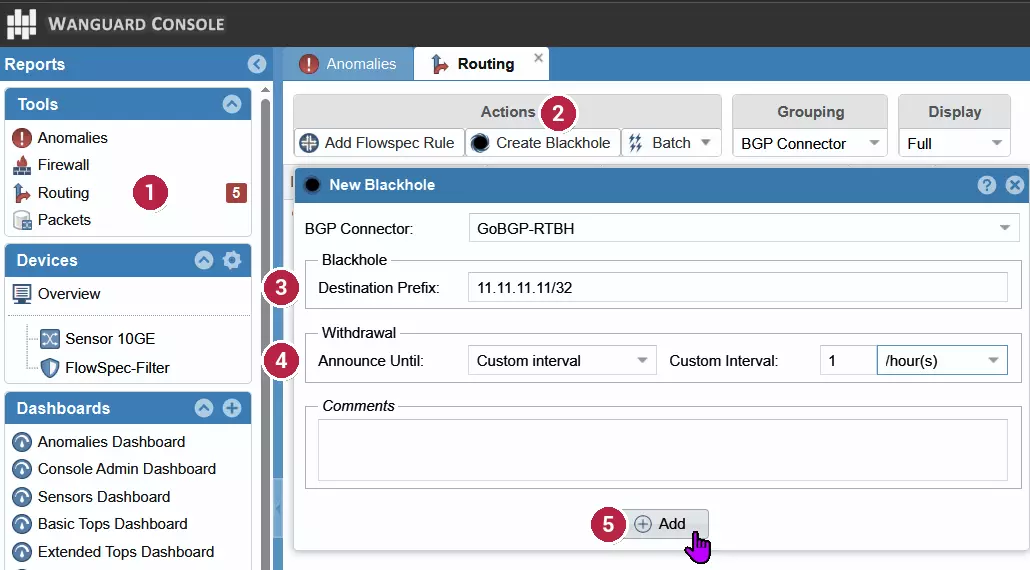
- Open Routing in the left Tools menu.
- Click Create Blackhole.
- Destination Prefix: the attacked IP as a
/32(e.g.11.11.11.11/32). Choose your RTBH BGP connector (e.g.GoBGP-RTBH). - Announce Until: Custom interval (e.g. 1 hour), the rule withdraws itself, or Manual withdrawal, it stays until you remove it.
- Click Add. WanGuard announces the blackhole to the BGP peer.
BGP FlowSpec: step by step
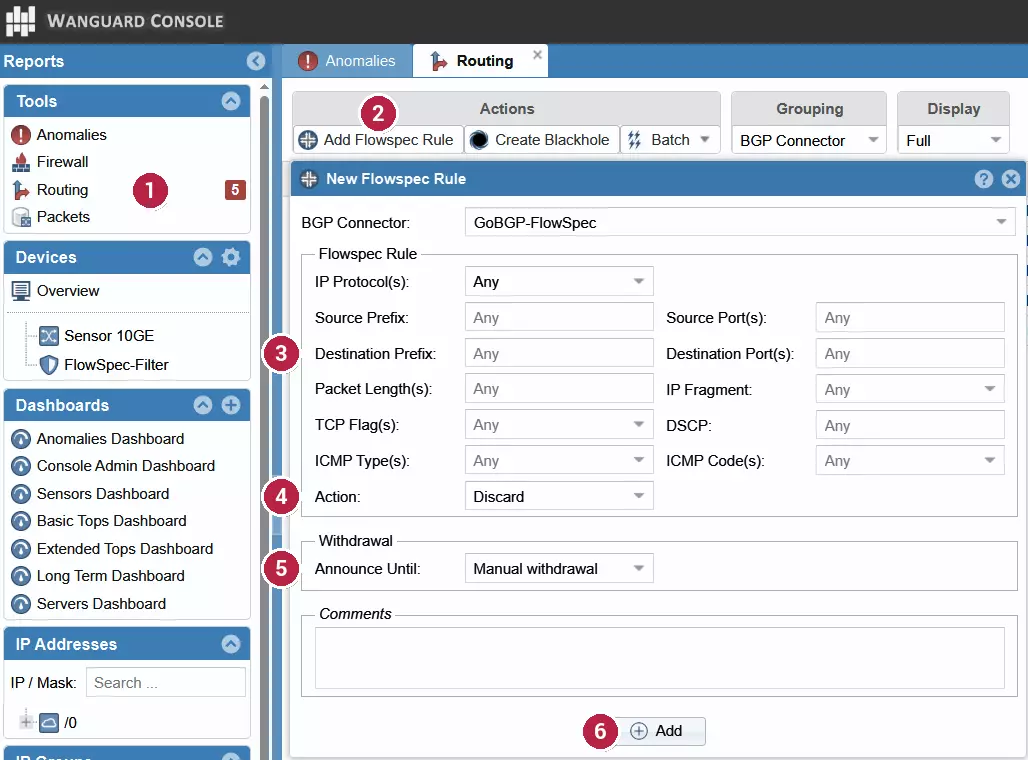
- Open Routing in the left Tools menu.
- Click Add Flowspec Rule.
- Destination Prefix: the attacked IP (
/32). Add a Source Prefix if needed. - Set the match and the action: IP Protocol, Source/Destination Port(s), optionally ICMP type or packet length, and Action = Discard (or Rate limit). Choose your FlowSpec connector (e.g.
GoBGP-FlowSpec). - Announce Until: Manual withdrawal or Custom interval.
- Click Add. The rule is announced over BGP FlowSpec.
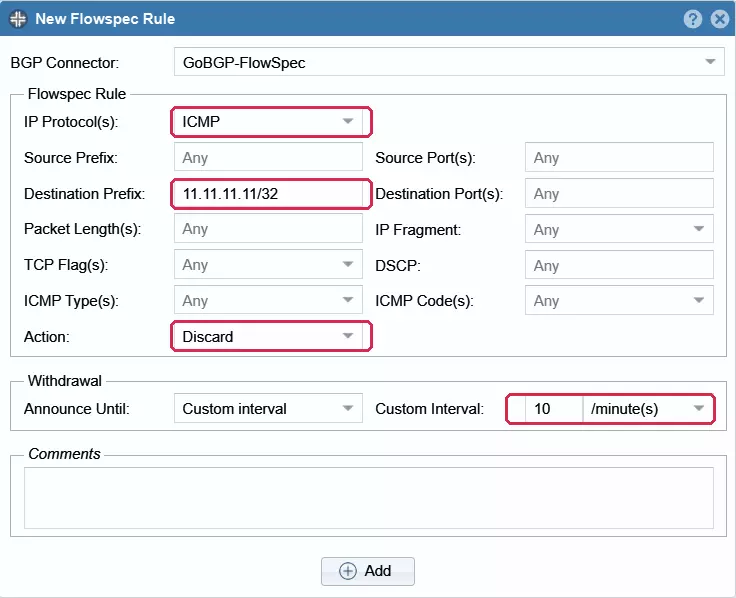
Example: drop an ICMP flood for 10 minutes
IP Protocol = ICMP, Destination Prefix = 11.11.11.11/32, Action = Discard, Announce Until = Custom interval, 10 minute(s).
RTBH or FlowSpec, which one?
| RTBH | BGP FlowSpec | |
|---|---|---|
| Scope | Whole IP (/32) | Only matching traffic |
| Host stays online? | No | Yes |
| Time to apply | Instant | Instant |
| Needs | A BGP peer that honours a blackhole | FlowSpec-capable routers or upstream |
| Best when | Saving the link and network | You can describe the attack |
Requirements
- A BGP connector must be configured in WanGuard (you select it in the form), and the peer or upstream must accept the announcements.
- BGP FlowSpec requires routers or an upstream that accept FlowSpec (RFC 8955).
- To remove a rule: Routing → select the entry → withdraw. Time-based rules withdraw themselves when the interval expires.
ITORO configures WanGuard, the BGP connectors and routers for RTBH and BGP FlowSpec. Questions? get in touch.
