WanGuard 9.0
DDoS protection profiled for your network.
Deployed, tuned and maintained by ITORO.
How fast WanGuard protection reacts
WanGuard's reaction time depends on how traffic is collected. Our recommendations, from the fastest method to the slowest: port mirror, IPFIX 315, sFlow and, last, NetFlow/IPFIX.
A traffic copy from port mirror and IPFIX 315 gives full packet information, including fragmentation. In sFlow you see it only in sampled packets, and NetFlow and IPFIX usually do not carry it. With NetFlow, sFlow and IPFIX, protection works the same way, and every reaction happens only after the switch or router exports the flows.
WanGuard 9.0 and 8.5: time from detection to reaction
Shorter = better (faster). Typical reaction time in live ITORO deployments and according to the vendor. With sFlow, NetFlow and IPFIX, blackholing and filtering react the same way, after flow export.
What happens in the first seconds of a DDoS attack?
Three typical protection actions. WanGuard matches the reaction to the strength of the attack: first a precise filter, blackholing once the threshold is exceeded, and when the attack starts to saturate the link (Uplink) – diverting the prefix to a scrubbing center that cleans the traffic.
This is what an attack looks like in the WanGuard 9.0 console
Every stage in full screen. Turn on “ITORO commentary” to see what we are looking at; click a screen to enlarge it.
Gallery
Click to enlarge.
Vendor screens
WanGuard 9.0 for your network
We do not sell modules, but working protection: from choosing the data source to maintenance.
A traffic copy from port mirror or flows from your existing routers – matched to your topology and budget.
RTBH, BGP FlowSpec and filter configured for your routers and transit operators, with conditions and priorities.
Customer groups, threshold templates and traffic profiles – no false alarms at peak time.
Customer Portal, post-attack reports and a list of actions WanGuard ran after protection was triggered.
Protection events and trends, statistics overview and traffic telemetry across WanGuard – from a single attack to 5 years of history.
Updates, threshold and reaction reviews, support from SILVER to PLATINUM.
Who WanGuard is for
Protecting the operator's network and its customers – subscribers and businesses – against volumetric attacks. Detection from a traffic copy or from NetFlow, sFlow, IPFIX from edge routers, and reaction via RTBH and BGP FlowSpec at your own network edge.
Deployments similar to data centres: a very large number of prefixes, with profiles and thresholds tuned so as not to block large legitimate traffic, which in hosting looks different than at an ISP. Precise filtering rules instead of cutting off the whole address, so the customer's service stays available.
Our largest deployments: many sensors and many devices exporting traffic as flows, and above all the most extensive lists, profiles and thresholds – for thousands of prefixes. We manage such systems mainly via API, so that WanGuard is fully synchronised with sales systems and technically consistent with customer profiles.
Networks that already have their own extensive protection system deploy WanGuard as an additional, fast layer at selected locations or for selected customers. They can also offer customers their own protection with full access and management capability.
WanGuard extension
Juniper MX firewall with telemetry in Grafana
WanGuard reacts to events: attacks from the internet and outgoing attacks from your customers, which draw further attacks onto the network. Firewall filters on Juniper MX run continuously and protect the router and the network before anything is detected. Router telemetry reaches Grafana dashboards every 60 seconds.
See Juniper MX firewall ›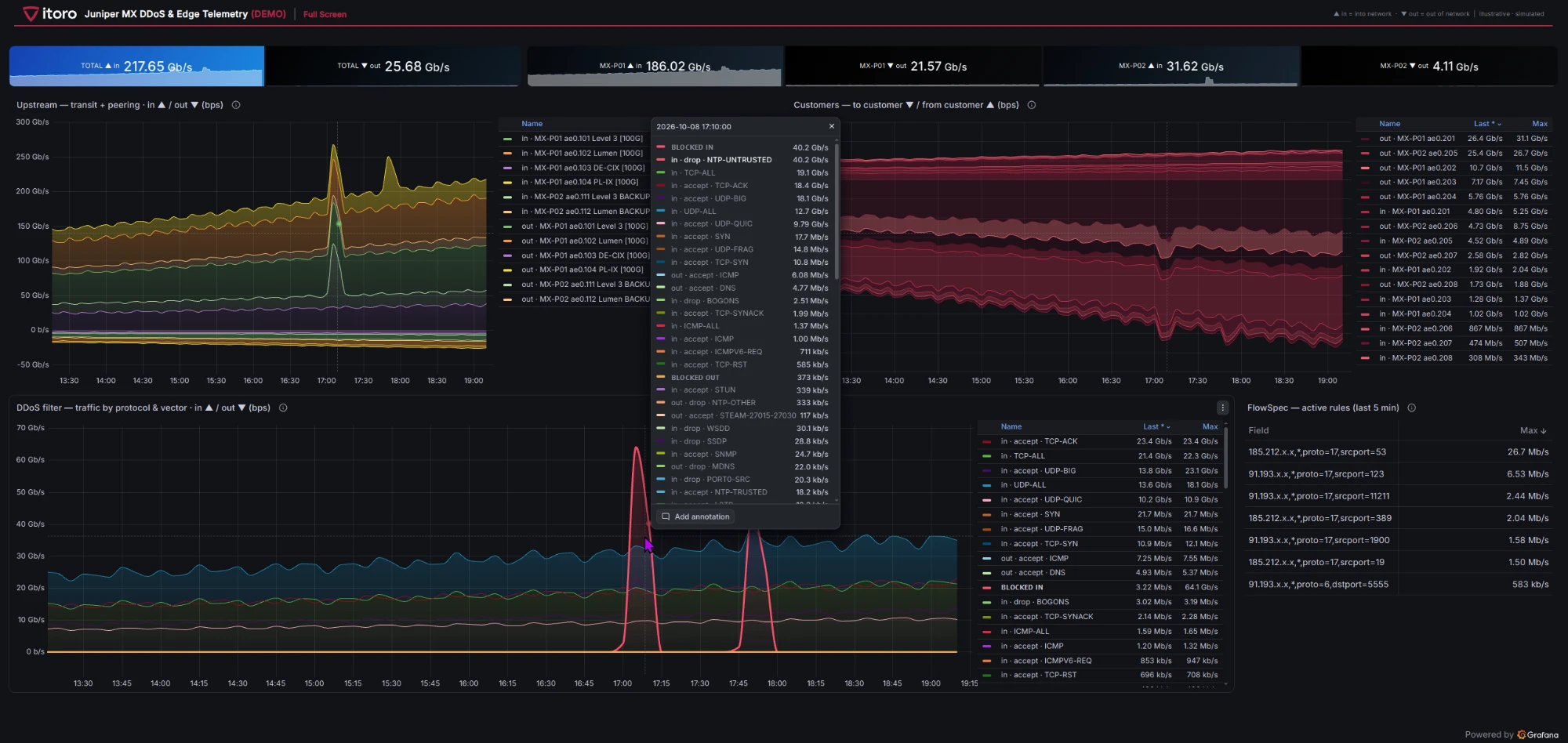
Which attacks WanGuard detects
Protection at Layer 4: TCP, UDP and ICMP. For HTTP, HTTPS or SSH, WanGuard sees only the traffic volume, without content analysis.
Volumetric
Floods, TCP flags and their combinations, fragments, traffic to port 0.
Amplification vectors
DNS, NTP, SSDP, Memcached, CLDAP, CHARGEN, SNMP, SLP, ARMS, CoAP, WSDD, STUN, MSSQLRS, RIPv1, mDNS, RPCBIND, NBNS, DNS‑UDP.
Carpet bombing
An attack on many addresses in a subnet at once.
Outgoing traffic
Infected devices in a customer's network that attack on their own.
What WanGuard 9.0 changes
Selected from the vendor's release information with the operator's work in mind.
Traffic profiles instead of a single threshold
WanGuard learns what each customer's normal traffic looks like over the day and the week, and reacts to deviation from that profile, not to one threshold for everyone.
New attack vectors: 15 decoders
ARMSCoAPWSDDSTUNMSSQLRSRIPv1mDNSRPCBINDNBNSDNS‑UDPTCP0UDP0TCP+ACK+PSHTCP+RST+FINTCP+FIN
Thresholds on subnets (carpet bombing)
Threshold rules for any subnet /20–/30 in IPv4 and /36–/64 in IPv6.
ClickHouse for flows and charts
Sankey, heatmaps and charts by flow dimensions, with no scale limits.
Inline filtering above 100 Gbit/s
Hardware filtering with DPDK on Mellanox/NVIDIA cards. According to the vendor, Packet Filter applies rules in < 1 s.
IPFIX 315 and Nokia SHIM
Packet export from Juniper routers (inline monitoring) and Nokia SHIM decapsulation.
BGP: more reaction options
Large communities, redirect-to-nexthop-ietf and, in the Filter, traffic redirection via BGP FlowSpec instead of dropping.
Reaction timeline in the attack report
The report shows successive protection actions and BGP announcements over time.
SSO login with SAML 2.0
Console login through your corporate identity system.
Maintenance that takes the load off your team
The same team deploys and maintains the installation. Your administrators and NOC look after the network, not the anti-DDoS server.
Sensors and filters
Checks every few minutes, automatic recovery.
Sensor without traffic
A dead port mirror or SPAN comes to light.
Telemetry
About 400 server and BGP session parameters.
Backups
Daily and before every change.
Changes
Only after your approval, with a work report.
Important reminders
About licences, support, and important service actions and updates.
Reports for management
GOLD package: attacks, vectors, infected hosts.
Prefix audit
Every network in IP Zone against the ITORO baseline.
Threshold audit
Amplifications, TCP flags, protocols from 9.0.
Profiling
Thresholds and profiles from your network's traffic.
Thresholds by triggers
Over-sensitive and dead thresholds to fix.
Attack trends
Vectors, hours, reaction time.
False alarms
And places where an attack could have passed without an alarm.
Summary
Thresholds before and after tuning.
Let's check your network
Topology, links and routers – a WanGuard 9.0 deployment option with a price from the price list.
Talk to an engineerPricing